At 1 A.M., an AI Writes Blog Posts Inside My Task System
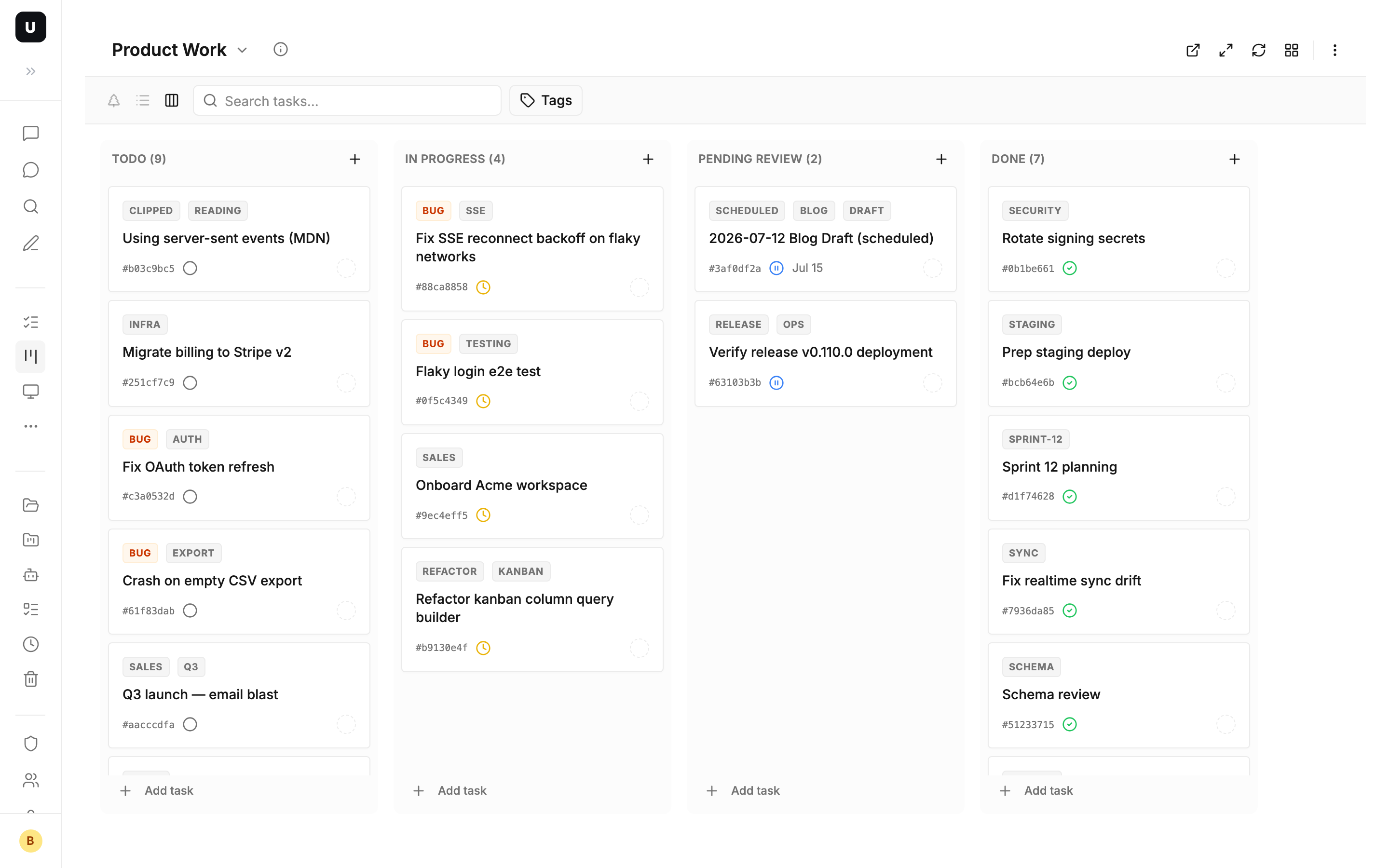
At eight in the morning, coffee in hand, I open my kanban board. Sitting in the Pending column is a new task:
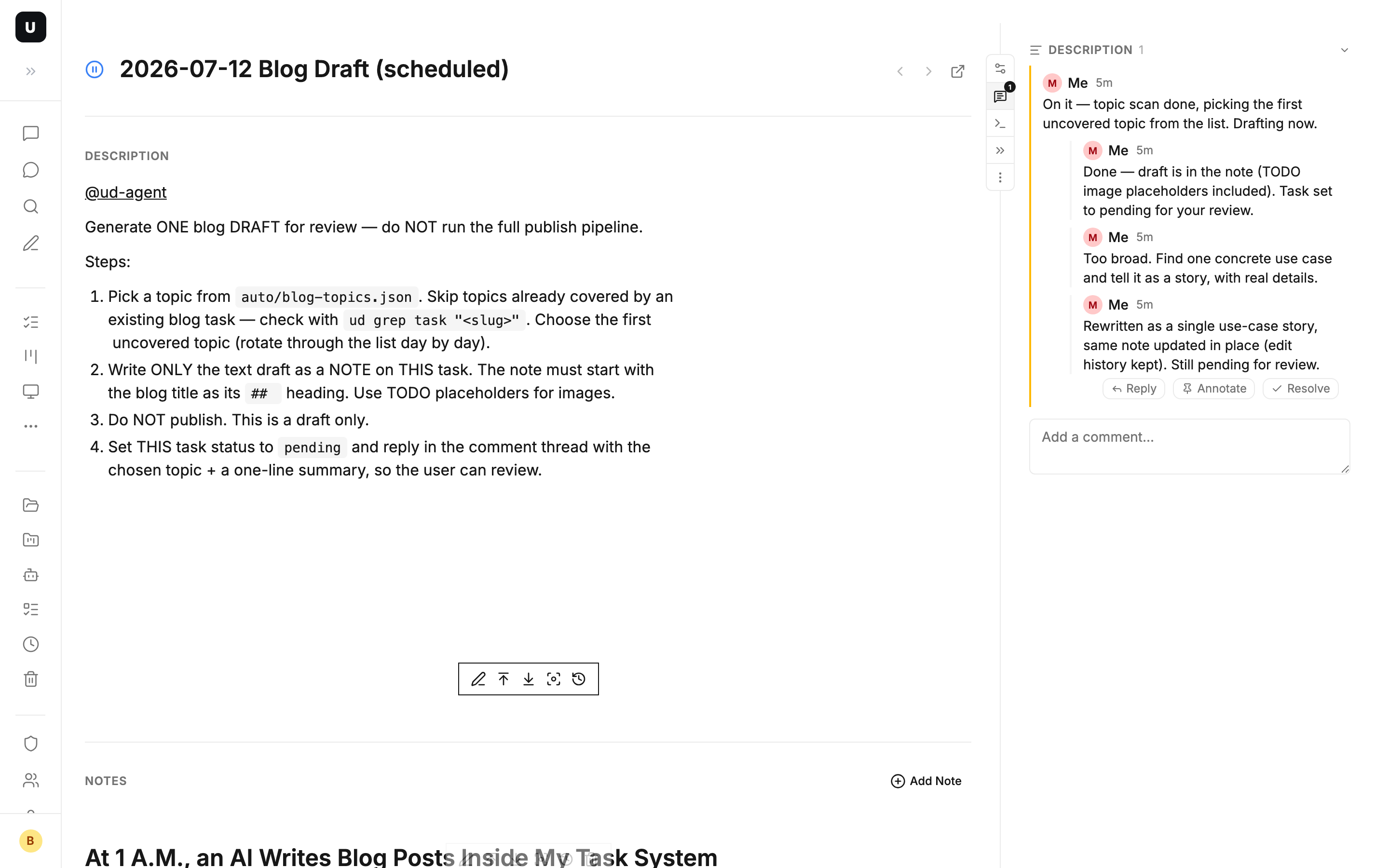
2026-07-12 Blog Draft (scheduled)
Inside it: a complete blog draft. And in the comment thread, two messages left overnight:
01:01 — On it — topic scan done, picking task-management-overview. Drafting now.
01:03 — Done — draft is in the note. Task set to pending for review.
The author is not a person. It's an AI agent. While I was asleep, it picked a topic, checked the product docs, wrote the draft, moved the task to "pending review", and said hi in the comment thread.
I read the draft and replied with one line: "Too broad. Find one concrete use case and tell it as a story." A few minutes later, the draft had been rewritten — the post you are reading now is the product of that rewrite.
This post is about how that pipeline is built, and why a task system is the most comfortable handoff point between humans and AI.
A task is not just a to-do item
First, a core design idea: in UnDercontrol, a task is a universal information container, not just a to-do.
A task can be:
- An actual to-do ("fix the validation bug on the login page")
- A document (a design proposal, meeting minutes, a wiki page)
- A decision record (why we chose option B)
- A blog draft (this post's draft lives as a note on a task)
The task body is Markdown. Combined with tags and custom metadata, you decide what a task is — instead of being boxed in by the tool's data structure.
The problem: I want a steady blog, without starting from zero every day
Anyone building a product knows this: content needs to ship consistently, but the activation energy of writing is brutal. Picking a topic, gathering material, structuring, drafting — every step burns energy that should have gone into code.
Let the AI write and publish fully automatically? No. Content that ships without a human gatekeeper burns your own reputation.
What I wanted was a human–AI pipeline: the AI does the grunt work (topic dedup, doc research, first draft), and I only do the one step that's actually worth my time — judgment and feedback.
So the question becomes: where does the AI's work go? Where do I review it? How does feedback flow back?
The answer: all of it lives in the task system.
The pipeline: 24 hours in the life of one task
There is no dedicated "AI platform" here. The pipeline is assembled from four native capabilities of the task system: scheduled jobs, @mentions, notes, and comments.
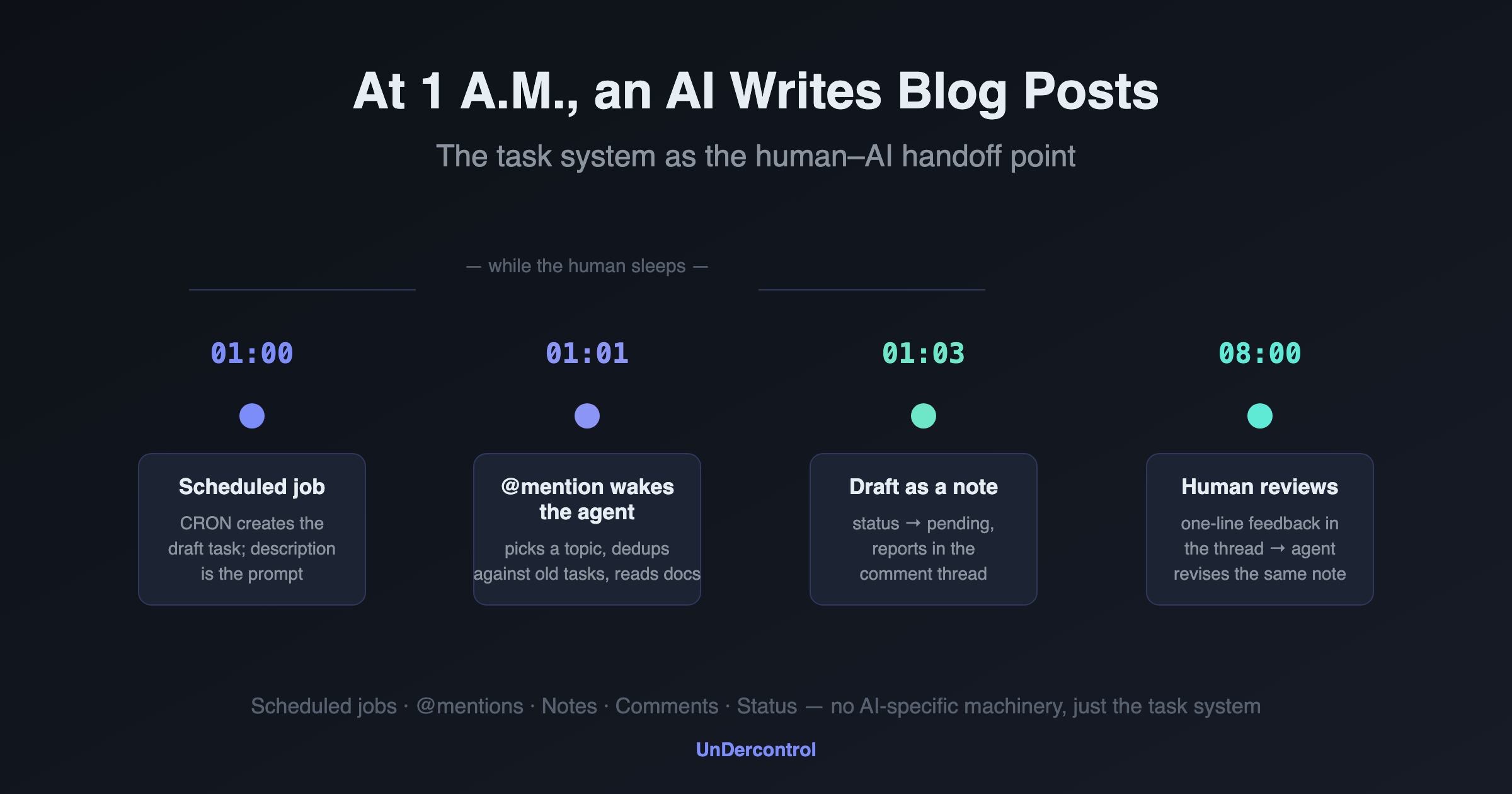
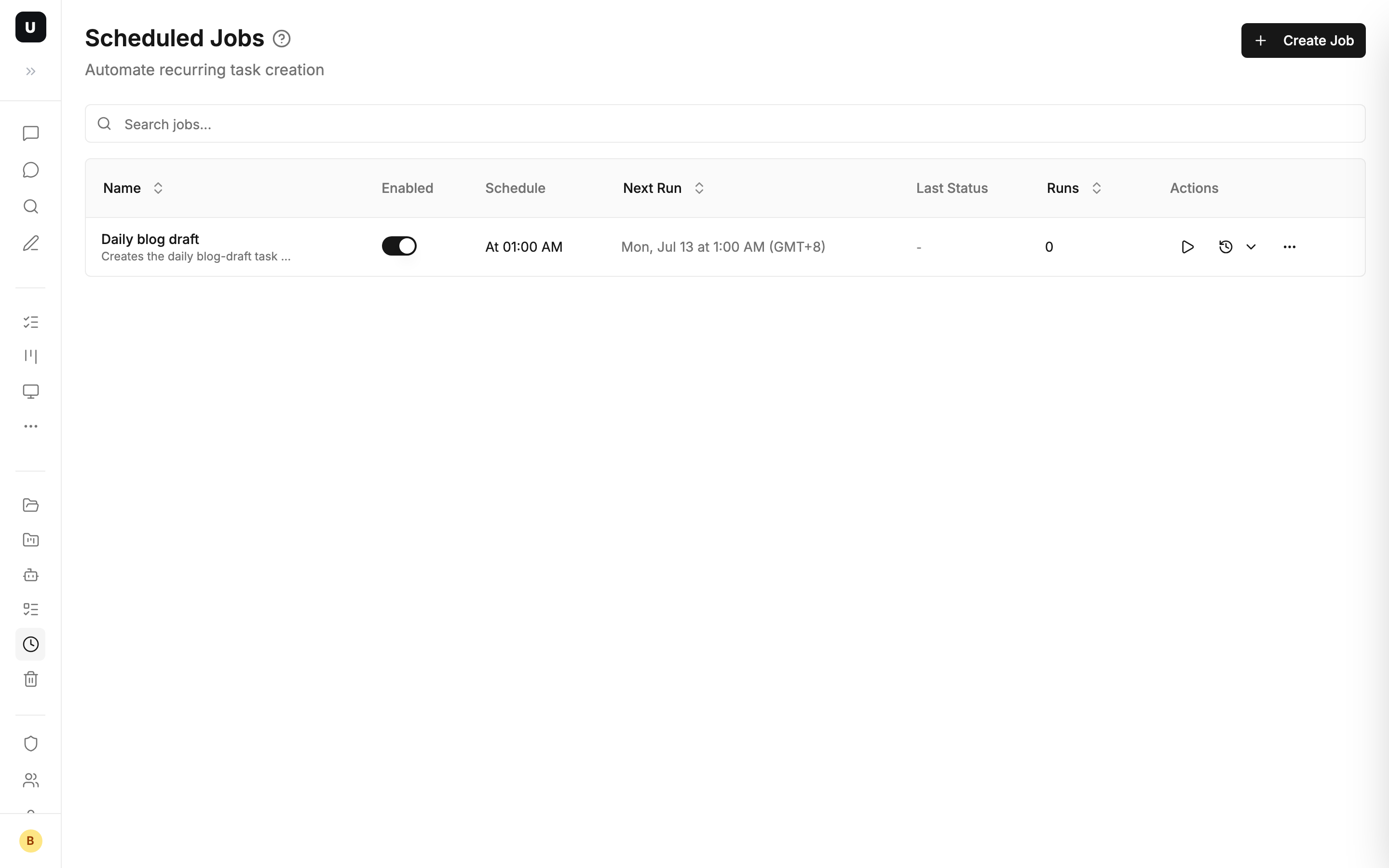
01:00 — The scheduled job fires
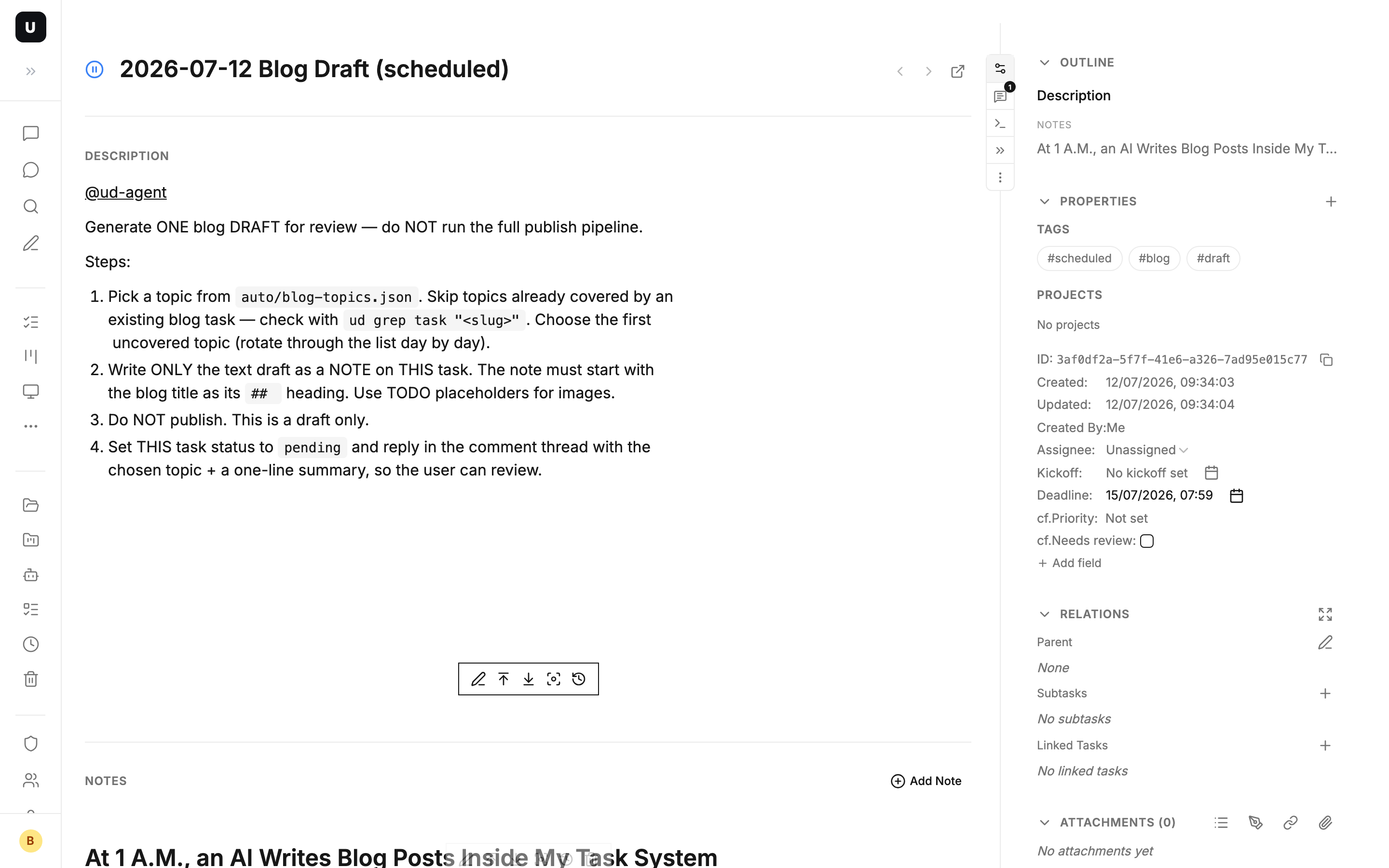
A daily scheduled job (CRON) creates the day's draft task. The task description is the complete instruction set for the AI, and it opens by @mentioning my agent:
[@ud-agent](mention://member/...)

Generate ONE blog DRAFT for review — do NOT run the full publish pipeline.

1. Pick a topic from `auto/blog-topics.json`. Skip topics already covered —
   check with `ud grep task "<slug>"`. Choose the first uncovered topic.
2. Write ONLY the text draft as a NOTE on THIS task.
3. Set THIS task status to `pending` and reply in the comment thread.
Notice the design here: the task description is the prompt. Instructions, boundaries ("do NOT publish"), acceptance criteria ("set to pending") — all written into the task. No separate configuration system needed. The task is the config.
01:01 — The @mention wakes the agent
The mention triggers an agent work session. It wakes up on my Mac, and the first thing it does is not writing — it's detective work:
- Read the topic list (a JSON file in the repo, 18 candidate topics)
- Search old tasks with
ud grep taskandud query "tags CONTAINS 'blog'"to see which topics are already covered - Sweep 27 historical blog tasks, find only 2 topics left uncovered — pick the first one
Then it leaves its first message in the comment thread ("On it — picking task-management-overview") before writing a word. It also reads the product docs to verify feature details first — an AI's worst habit is confidently making things up, and making it read the docs first cures most of that.
01:03 — The draft lands, the task flips to pending
The finished draft doesn't go to some "AI output panel" — it's attached to the task as a note. The task status is set to pending, which in our status model means "I'm done, waiting on someone else." The agent leaves a second message in the thread and clocks out.
The whole run took two minutes, and it happened after I fell asleep.
08:00 — I come online, and only judge
My review interface is just the task detail page: the draft in a note, the context in the description, the agent's work log in the comment thread. I don't need to open any other tool.
I read the draft and replied with one line in the thread. That line triggered a new agent session — it read the feedback, updated the same note via note_id (not a new note; notes keep full edit history, so a bad rewrite can always be rolled back), then replied in the thread describing what changed.
Back and forth, it feels like collaborating with a remote teammate through a ticket. Except this teammate starts work at 1 A.M. and never complains about rework.
Why the handoff point is a task, not a chat window
The biggest problem with collaborating with AI in a chat window is that output sinks. What it wrote yesterday is fifty screens up today; switch sessions and the context is gone.
Make the handoff point a task, and every part of the exchange gets a native container:
- Task description = requirements and instructions (a living document, always current)
- Notes = deliverables and process records (an append-only timeline with edit history)
- Comments = lightweight conversation (short, threaded, with @ notifications)
- Status = position in the workflow (
pendingmeans "awaiting review" — one glance at the board shows everything waiting on you)
And humans and AI access all of it through the same entrance. I read on the web and my phone; the agent reads and writes from the terminal via the CLI:
ud describe task 51c4981e      # read the task (notes, comments, attachments included)
cat draft.md | ud apply -f -   # write a note
Because the entrance is CLI + Markdown, the pipeline is not tied to any specific AI tool — Claude Code, Codex, OpenCode, or any terminal-based agent can plug in. Swap the agent tomorrow; the pipeline doesn't change by a single line.
Where else this pattern applies
The blog draft is just the most convenient example. The same loop — "scheduled job / @mention → agent works → notes for the record → pending for review → feedback in comments" — also runs our:
- Release verification: after CI ships a version, a task is created with the release notes attached; the agent runs smoke tests and writes results into a note
- Daily standup: a scheduled job creates a standup task every day; the agent summarizes yesterday's changes across all tasks
- Code research: throw "evaluate option X" at the agent, wake up to a comparison in the notes, ask follow-ups in the comments
There's only one common thread: every step of the AI's work stays in the task, and the human appears only at the checkpoints.
Takeaway
This pipeline uses no concept invented specifically for AI. Scheduled jobs, @mentions, notes, comments, status — all of it is what a task system already has. It's just that when your task system meets three conditions, it naturally becomes a human–AI workbench:
- Markdown-native — AI reads and writes without a translation layer
- A CLI entrance — any terminal agent can plug in; no vendor lock-in
- Status + comments + notes, all first-class — handoff, review, and records each have their place
One more thing: this very post is what the pipeline produced in the small hours of July 12, 2026. The version you just read is the second draft — written after a human replied with a single line: "Too broad. Find one concrete use case and tell it as a story."