30 posts tagged with "Feature"

Feature updates and highlights

View All Tags

Tags and Custom Fields: Organize Tasks by Your Own Dimensions

· 7 min read
Creator of UnDercontrol

Most tools decide for you what a task "looks like": a few fixed dropdowns, a hard-coded set of fields, someone else's taxonomy. But in reality every person, every team, every workflow wants to track different dimensions — one needs "priority", another needs "client", "estimate", "department", and someone else just wants to slap on a tag and filter later.

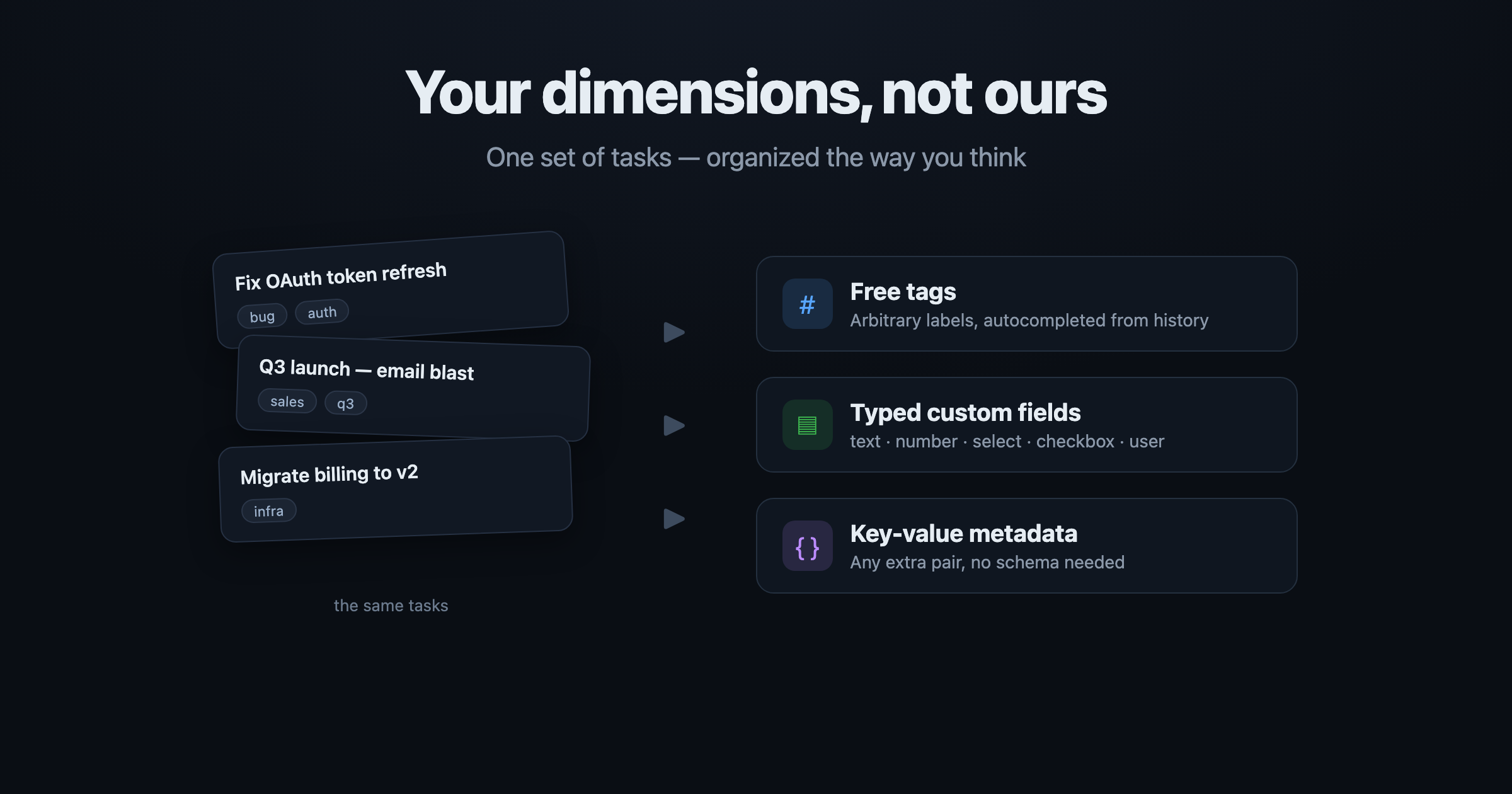
UnDercontrol doesn't impose structure. It gives you three composable layers: free-form tags, typed custom fields, and arbitrary key-value metadata. All three are directly queryable, so you can slice the same set of tasks along your dimensions instead of bending to the tool's taxonomy.

This rests on a core UnDercontrol idea: a task is not just a to-do — it's a universal container for information. The same Markdown editor runs across tasks, notes, expenses, and accounts — every text surface. Tags and custom fields are how you layer your own structure on top of that container.

The same set of tasks, sliced freely by tags / custom fields / key-value metadata

Everything is a Task: One Container for To-dos, Docs, Notes, and a Knowledge Graph

· 7 min read
Creator of UnDercontrol

Unix has a famous design philosophy: everything is a file. Directories, devices, pipes, sockets — all read and written through one uniform interface. Simple, unified, composable.

UnDercontrol borrows the same idea, just with a different primitive: everything is a Task.

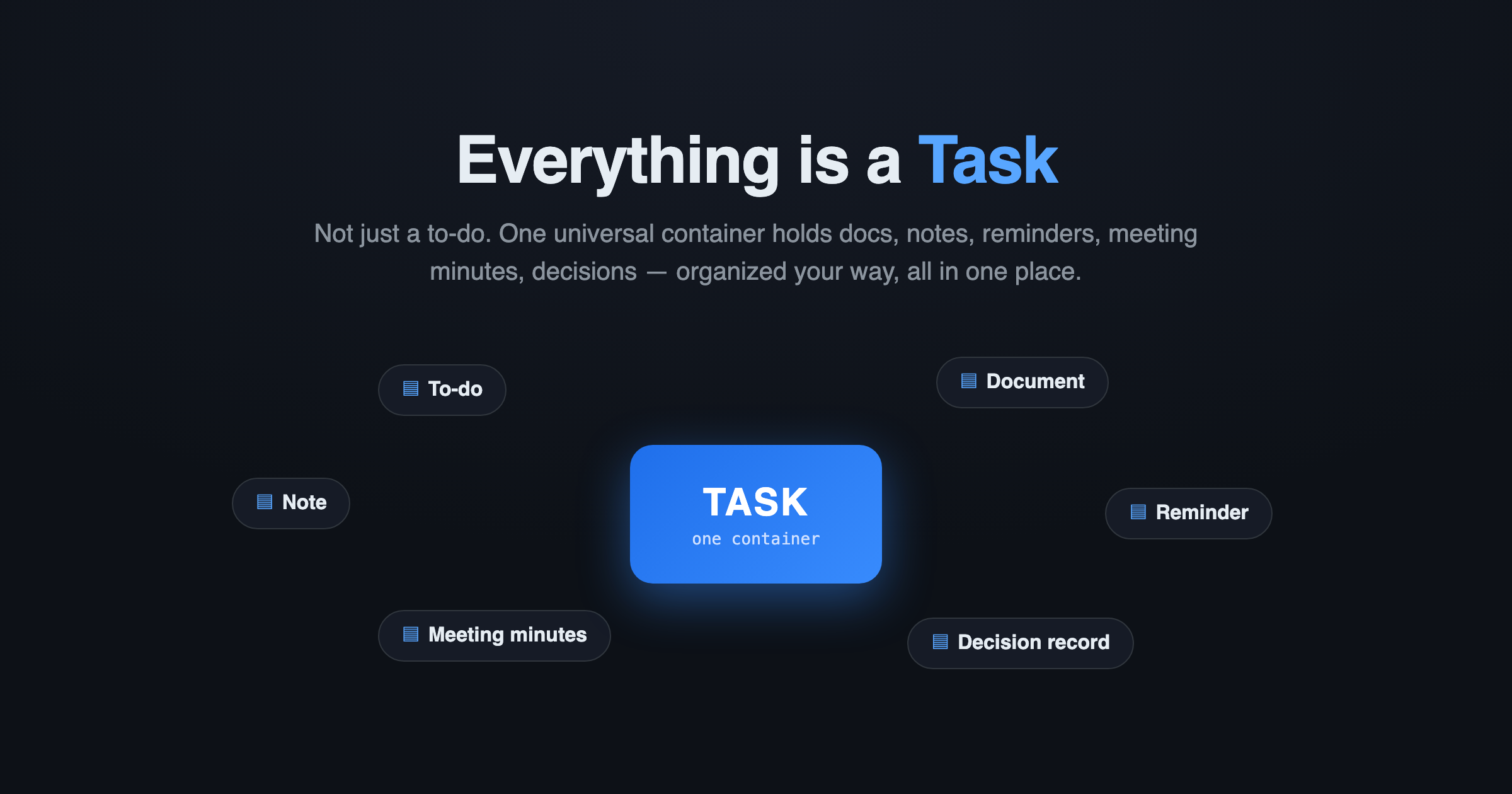
Everything is a Task

Most tools treat a "task" as a single line with a checkbox. UnDercontrol never did. Here, a Task is a universal information container — it can be a to-do, a document, a reminder, a blog draft, meeting minutes, a decision record, even a wiki page. One data source, organized your way, all in one place.

Everything as Code: When Your Tasks Become Markdown You Can Commit to Git

· 5 min read
Creator of UnDercontrol

We've all gotten used to "X as Code" — infrastructure as code, configuration as code, docs as code. The reason is simple: plain text can be diffed, reviewed, version-controlled, and read or written directly by scripts and AI.

So why are your tasks, notes, and todos still locked inside some SaaS database, reachable only by clicking through its UI one item at a time?

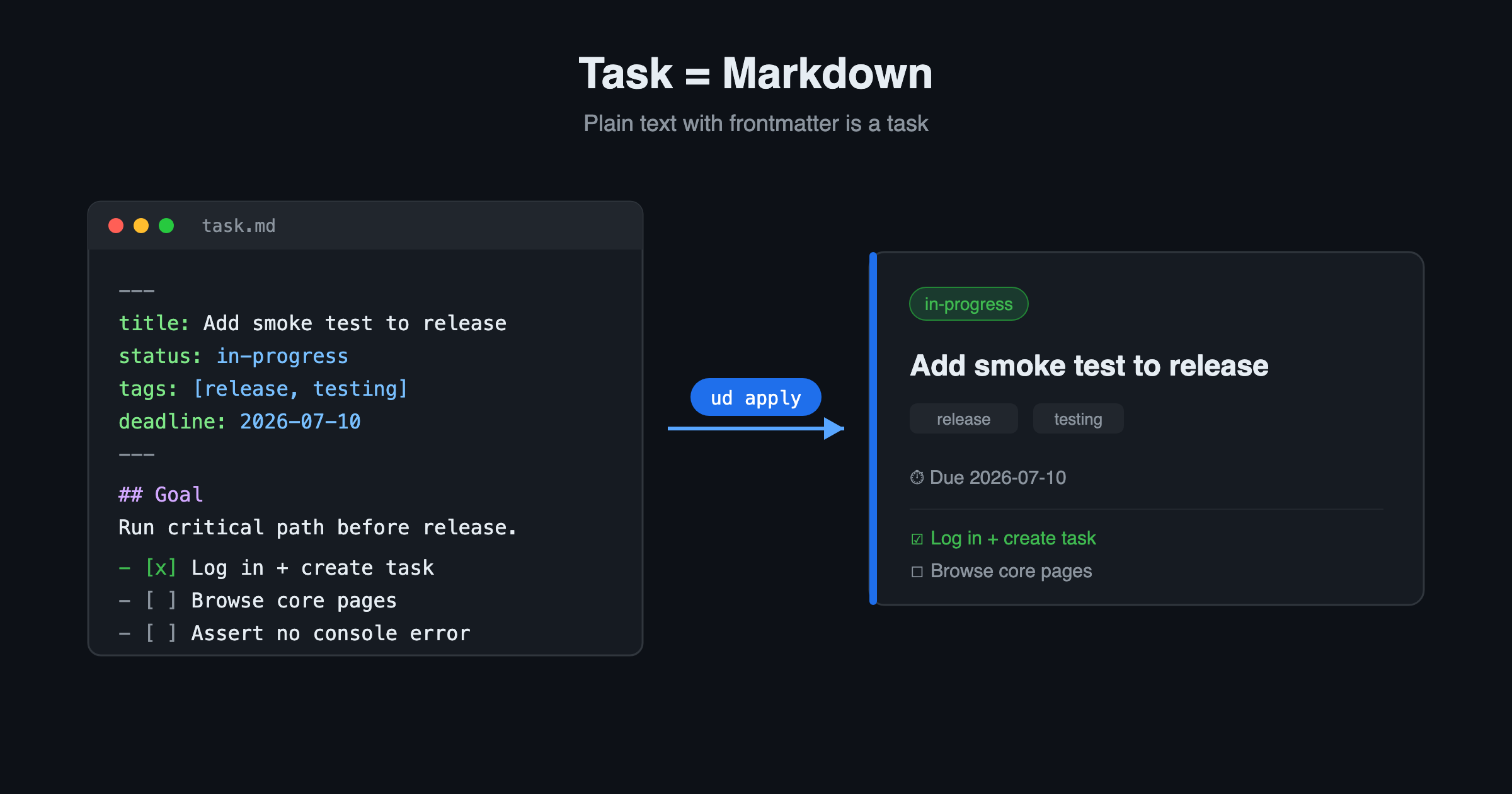
UnDercontrol's answer is Everything as Code. Here, a task is a piece of Markdown with YAML frontmatter. That's it.

A task is Markdown: plain text with frontmatter renders into a task card after apply

Access Anywhere — Web, Desktop, CLI, and Beyond

· 7 min read
Creator of UnDercontrol

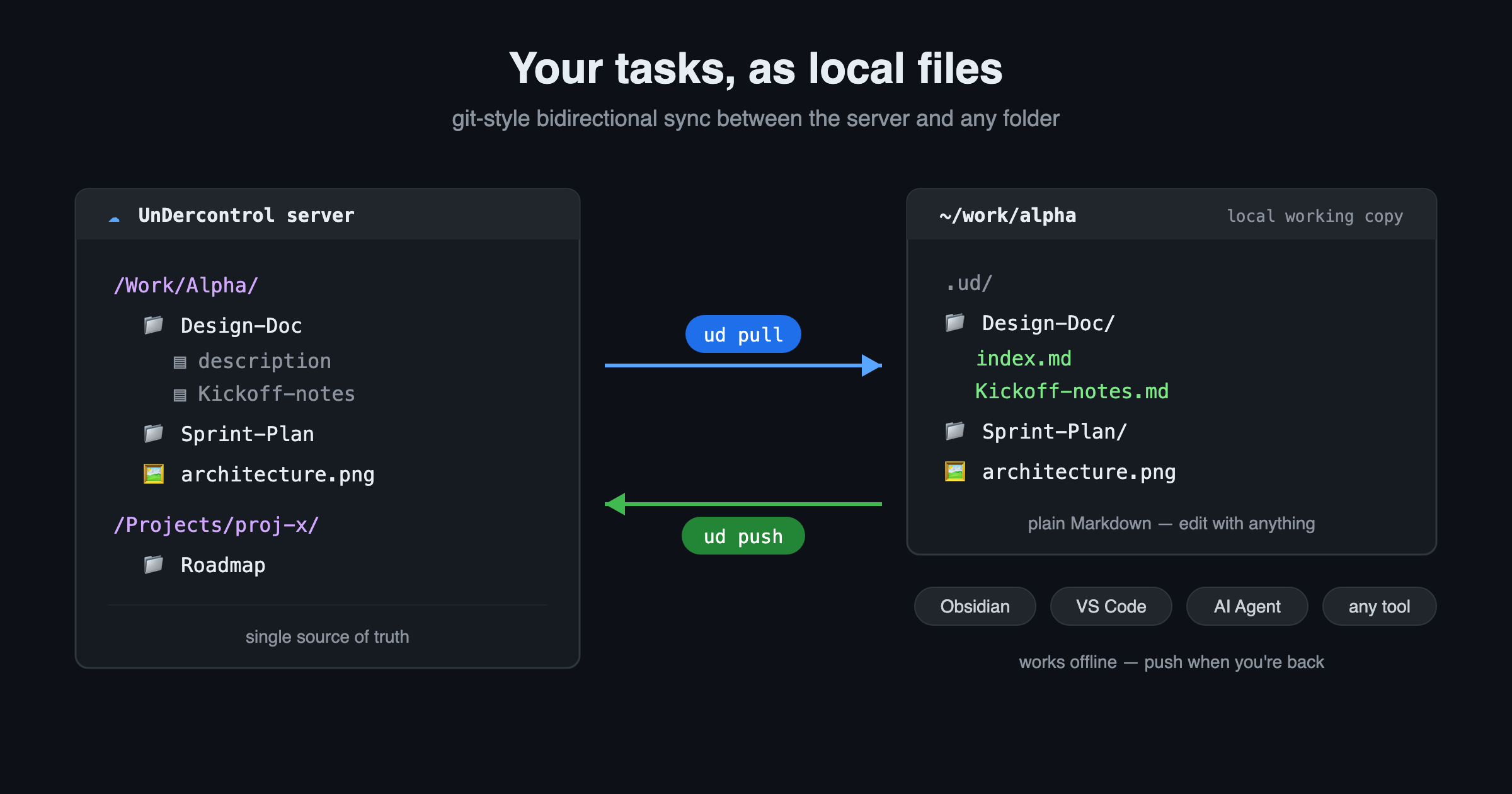
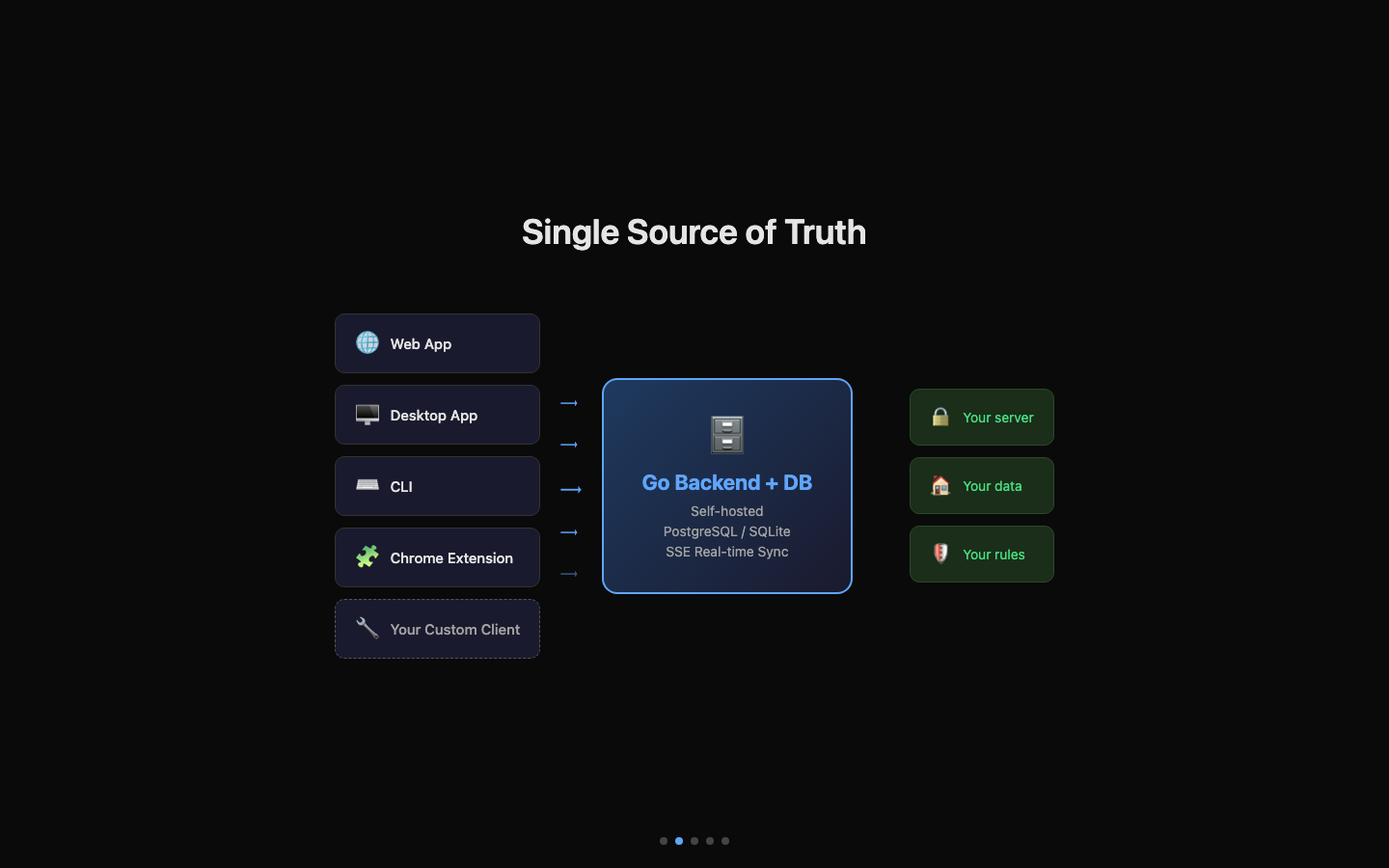
When choosing a productivity tool, you often face a familiar dilemma: web apps are powerful but useless offline, desktop apps feel great but lock your data locally, and CLI tools are developer-friendly but lack a visual interface. The root cause is the absence of a Single Source of Truth — each platform is an island, and your data is scattered across them. UnDercontrol's answer: four form factors, one data source. And that data source is entirely under your control — self-hosted on your own server or stored on your local disk, never passing through any third party. Privacy and security are defined by you.

Single Source of Truth architecture

Rich Markdown in Your Tasks — Code, Diagrams, and More

· 7 min read
Creator of UnDercontrol

What Is a Task?

In UnDercontrol, a Task is the core unit of information. If you've used Jira, think of it as an Issue; if you've used Obsidian, think of it as a Note. A Task is essentially a piece of content bound to a status, with first-class attributes (title, tags, link relationships, etc.) and support for unlimited custom metadata fields (key-value pairs), so you can attach any information to it. Through the Notes mechanism, a Task can continuously evolve — recording progress, discussions, and decisions, accumulating into a complete knowledge context over time.

This post covers the rich-text capabilities shared across all text input surfaces in UnDercontrol. We say "tasks", but it's not just tasks — whether it's a task description, a note, an expense memo, or an account annotation, they all use the same Markdown editor. The code blocks, Mermaid diagrams, tables, and checklists you use in tasks work identically in notes and every other context.

Remote Workspace — Run AI Agents on Your Machine from the Browser

· 7 min read
Creator of UnDercontrol

You write a task description in the web UI. You click a button. Thirty seconds later, an AI agent on your laptop is reading the task, writing code, running tests, and posting progress notes back to the same task page — all while you watch from the browser.

That's Remote Workspace. It bridges the gap between a cloud-based task manager and your local development environment, turning UnDercontrol into a remote control for AI-powered coding agents.

Share a Task Without Sharing Your Password

· 4 min read
Creator of UnDercontrol

You're at a coffee shop. Someone asks about that project plan you've been working on. You could pull up your account, log in, and hand them your laptop — but you'd rather not.

UnDercontrol's task sharing solves this exact problem. Generate a public link, hand over a short access code, and anyone can view that specific task — your description, notes, attachments, the whole thing — without needing an account or touching your credentials.

Kanban Board Filters: 4 Levels from Broad Scope to Laser Focus

· 6 min read
Creator of UnDercontrol

When you have dozens or hundreds of tasks, the kanban board needs to be more than a flat dump of everything. UnDercontrol's kanban boards use a layered filtering system that narrows your view step by step — from the broadest scope down to a real-time search. Understanding these four levels will change how you organize your work.

Reusable AI Skills — Prompt Templates You Own

· 5 min read
Creator of UnDercontrol

If you've spent any time working with AI assistants, you've probably built up a mental library of prompts that actually work. The refactoring prompt that always gets clean output. The commit message template that matches your team's style. The bug-triage checklist you paste in every time something breaks in production.

The problem is those prompts live in your head, or a sticky note, or buried in a Notion doc nobody remembers to open. UnDercontrol's skills system fixes that.

What Are Skills?

Skills are named, reusable prompt templates stored inside UnDercontrol. Each skill has a slug (e.g., refactor-ts, daily-standup, pr-review), a markdown body, and belongs to a group. That last part matters — skills are group-scoped, so a team can share a library of prompts without everyone maintaining their own copy.

You can create and edit skills through the web UI, manage them from the CLI, or apply them declaratively from a YAML file. The markdown content supports the full range of prompt structures: instructions, variables, multi-step workflows, whatever your use case needs.

Creating a Skill

From the web editor, creating a skill is about as straightforward as writing a note. Give it a name, a slug, and write your prompt in the markdown editor. Save it, and it's immediately available to everyone in the group.

From the CLI, you can apply a skill definition the same way you'd apply a task — as a markdown file with YAML frontmatter:

ud apply skill -f pr-review.md

Your file might look like this:

---
name: pr-review
description: PR Review Checklist
tags:
- ai
- development
---

Review the following pull request diff and provide feedback on:
- Logic correctness
- Error handling
- Test coverage
- Naming and readability

This makes skills portable. Check them into your dotfiles repo, version them with the rest of your configuration, and deploy them to a new UnDercontrol instance with a single command.
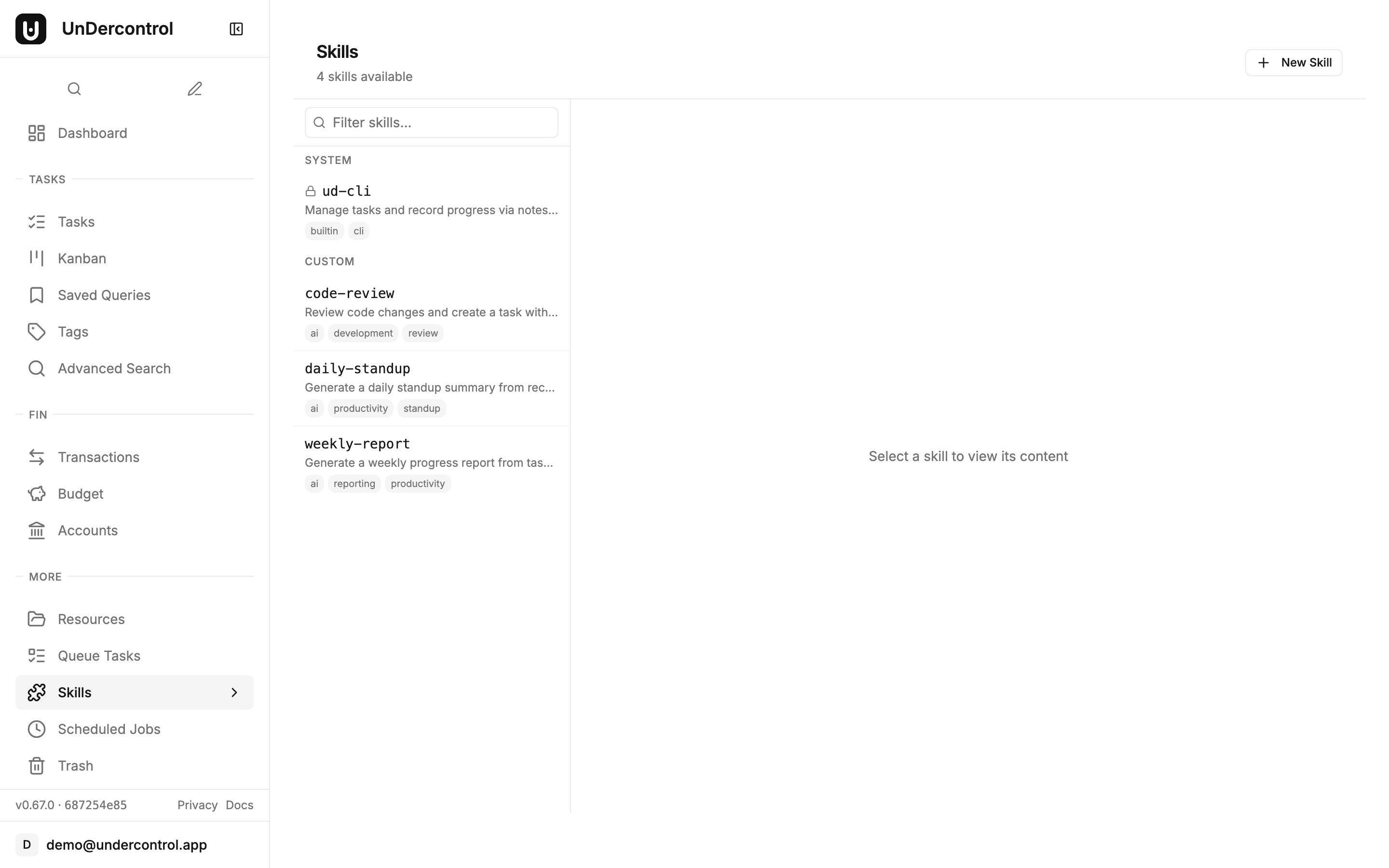
Skills page showing system and custom skills with search and tags

Using a Skill — The ud prompt Command

The real payoff is how you consume skills. The ud prompt command fetches a skill by slug and outputs its content to stdout. From there, you can pipe it anywhere.

Want to feed a skill into Claude Code?

claude-code $(ud prompt pr-review)

Want to compose it with other commands in a pipeline?

ud prompt pr-review | pbcopy

Because it's just stdout, ud prompt works with any tool that reads from stdin — Claude Code, other local AI agents, shell pipelines, whatever fits your workflow. UnDercontrol doesn't try to own the AI layer; it just manages the prompts so you don't have to.
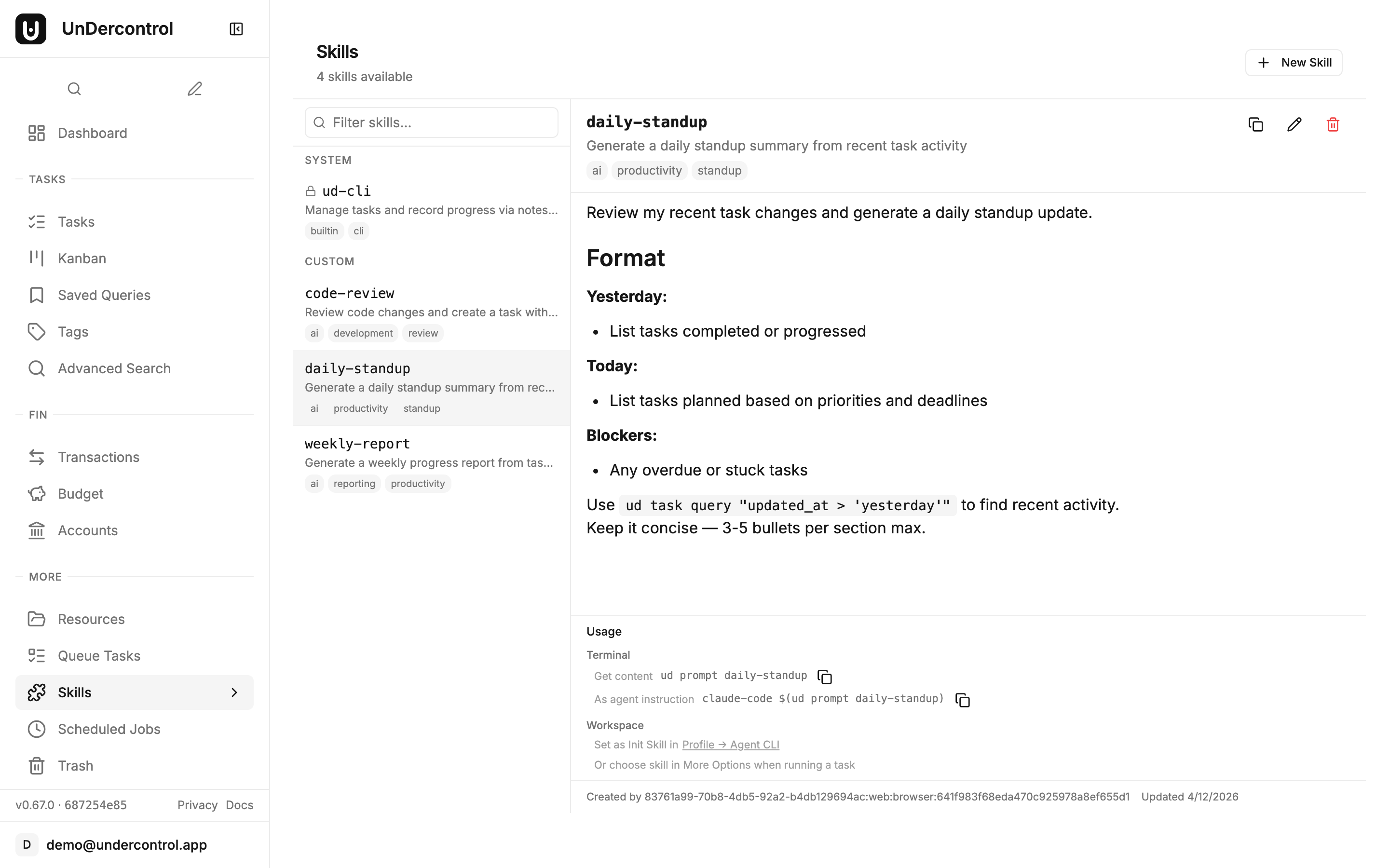
Skill detail view with markdown content and CLI usage commands

Built-in System Skills

UnDercontrol ships with built-in system skills that are seeded on first startup. These are read-only — you can't accidentally overwrite them — and they serve as both useful defaults and examples of how skills are structured. The ud-cli system skill, for instance, provides a comprehensive reference for the CLI's command structure, making it immediately available to AI agents that need to interact with your tasks.

System skills are marked with a lock icon in the web UI and appear alongside your custom skills. You can reference them by slug just like any custom skill.

Managing Skills Over Time

Skills are first-class resources in UnDercontrol, which means full CRUD support through both the web UI and the CLI.

  • ud get skills — list all skills in your group
  • ud describe skill <id> — inspect a specific skill's full content
  • ud delete skill <id> — remove one you no longer need
  • ud apply skill -f skills/ — apply an entire directory of skill definitions at once

The web editor is useful for quick edits and browsing what's available. The CLI is better for automation, bulk updates, and treating your prompt library as code.

Why This Matters

The idea behind skills is simple: the prompts that work well are worth keeping. Storing them in a self-hosted, group-scoped system means they don't disappear when someone leaves the team, don't get lost in a chat history, and don't require everyone to reinvent the same workflow independently.

It also keeps your prompts private. Because UnDercontrol is self-hosted, your prompt library — which often encodes institutional knowledge, internal processes, and domain-specific context — stays on your own infrastructure.

Get Started

Skills are available in UnDercontrol today. If you're already running an instance, you'll find the Skills page in the sidebar. If you're setting up for the first time, the self-hosting guide walks through deployment in about ten minutes.

Read the documentation or deploy your own instance to get started.